

Using your own drone footage
Optional: SRT telemetry, orbit protocol and checklist (not the Field tool).
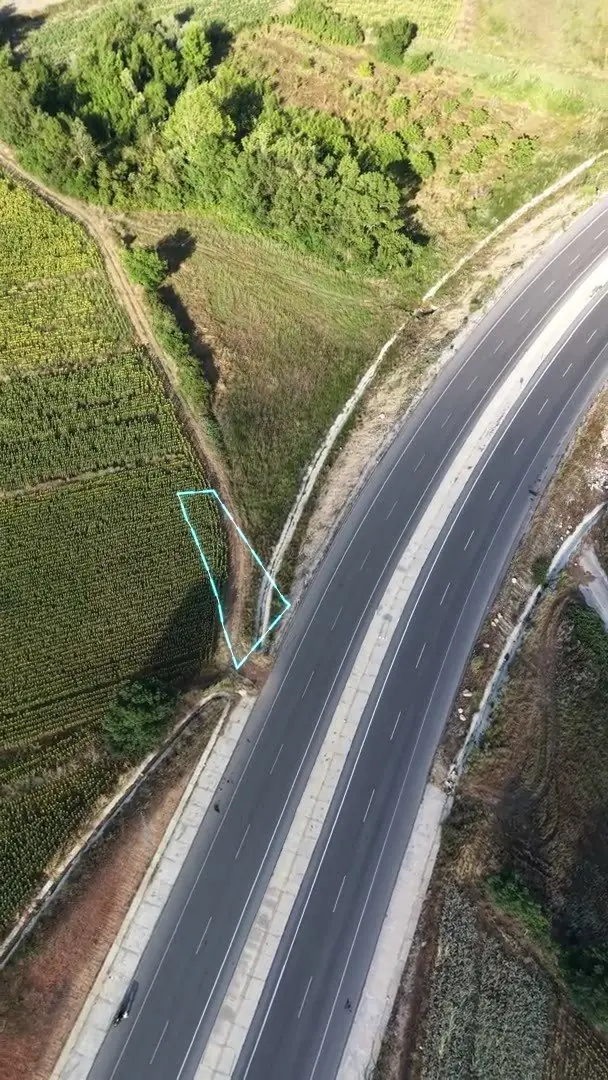
If you have aerial footage you can overlay the parcel boundary on the real image. For that, the camera's position in every frame must be known — this information is held in the SRT (GPS subtitle) file.
Upload flow
- Open your parcel file → enter the block/parcel (the boundary arrives automatically).
- Editor → Video → upload your drone footage. SRT varsa you do a one-off alignment; after that the boundary follows frame by frame using the telemetry otomatik takip edilir. SRT yoksa ilk karede parselin köşelerini işaretlersin.
- “Overlay boundary and generate” → your professional promo video is ready.
Field filming protocol (DJI Mini 5 Pro and similar)
A step-by-step field protocol for a sale-ready orbit shot with no prior knowledge. The goal: one smooth full circle, parcel-centred, at a constant altitude.
A · Before you leave home (preparation, ~15 min)
- Fully charge the batteries and controller; format the memory card.
- Update the DJI Fly app and the drone firmware.
- Ayarlardan Turn ON video captions / SRT recording — GPS telemetrisi bu dosyada tutulur.
- Set the resolution to 4K · 30 fps; check for flight permissions and restricted zones.
B · On site, before take-off (~10 min)
- Choose an open, unobstructed take-off point; check the wind and weather.
- Calibrate the compass and confirm the home point.
- Locate the parcel on the map or by eye; identify its centre.
C · Filming (the most critical step)
- Parsel merkezli orbit: In POI/Waypoint mode lock the camera on the centre of the parcel and fly one slow full circle at a constant altitude.
- Move slowly and smoothly; avoid sudden jolts.
- Fly a few orbits at different heights and angles — you can pick the best one later.
D · Landing & files
- Keep the MP4 and SRT pair together for each clip; the names must match.
- Transfer the files and follow the upload flow above.
Printable field checklist
A pocket-sized summary of the protocol. Print it before heading out or save it as a PDF on your phone; tick the items before every flight.
Parselo · On-site checklist
Drone parcel shoot — pre- and post-flight checks
Before you leave
- Batteries and controller fully charged
- Memory card formatted
- DJI Fly and drone firmware up to date
- Video subtitles (SRT) turned ON
- Resolution 4K · 30 fps
- Flight permissions/restrictions checked for the area
On site, before take-off
- Take-off point clear and unobstructed
- Wind and weather suitable
- Compass calibrated, home point confirmed
- Parcel centre identified
Filming
- POI mode on — camera locked to the centre
- A SLOW full orbit at constant altitude
- A backup orbit taken from a different altitude
Landing & files
- MP4 and SRT together for each clip, names matching
- Files transferred to your phone or computer